

Download AccuSpell – Spell Checker, Grammar Tool, Writing Assistant, Word Correction, Typo Fix
Overview
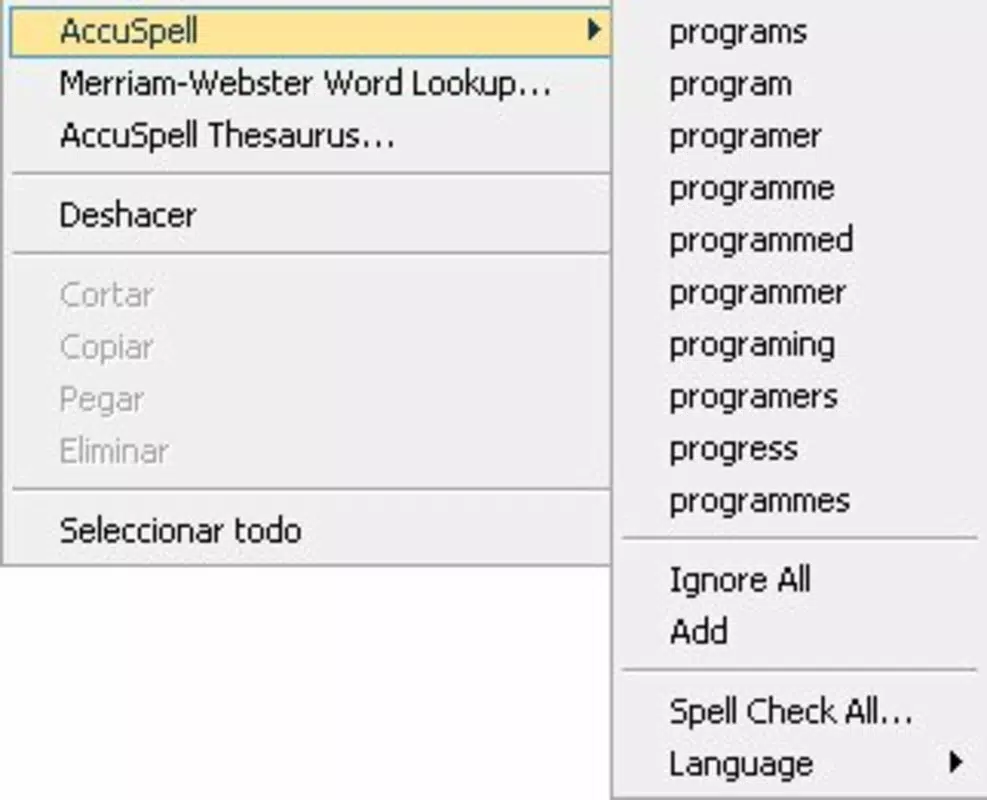
AccuSpell is a compact yet powerful tool designed to improve writing accuracy across various digital environments. Targeted primarily at English speakers, the application functions as a real-time spell checker that underlines misspelled or unrecognized words in red wherever typing occurs on a Windows computer. This includes common applications such as web browsers, Notepad, email clients, and search bars. By providing immediate visual feedback, AccuSpell helps users identify and correct errors as they write, enhancing both clarity and professionalism in written communication.
The app is especially useful for students, professionals, and content creators who rely on precise language in their daily tasks. It addresses a common pain point in digital writing: the delayed discovery of spelling mistakes. With AccuSpell, users can maintain higher standards of written output without interrupting their workflow. The developer, AccuSpell, has focused on delivering a lightweight, efficient solution that operates seamlessly in the background.
Although the developer did not provide additional technical details, the app’s minimal size of 2.5 MB suggests a low resource footprint. It was released on August 20, 2010, indicating a long-standing presence in the productivity software space. While no formal performance metrics were listed, its continued availability suggests reliability. The tool’s focus on English language support makes it a targeted utility for users whose primary writing needs are in English.
Key Features & Functionality
- Real-time Spell Checking: AccuSpell continuously monitors text input across supported applications, flagging misspelled words instantly. This feature is particularly effective in environments where speed and accuracy are critical, such as drafting emails or writing reports.
- Custom Dictionary Support: Users can add personal or industry-specific terms to the dictionary, ensuring that technical jargon, names, or unique phrases are not flagged as errors. This is ideal for professionals in fields like medicine, law, or technology.
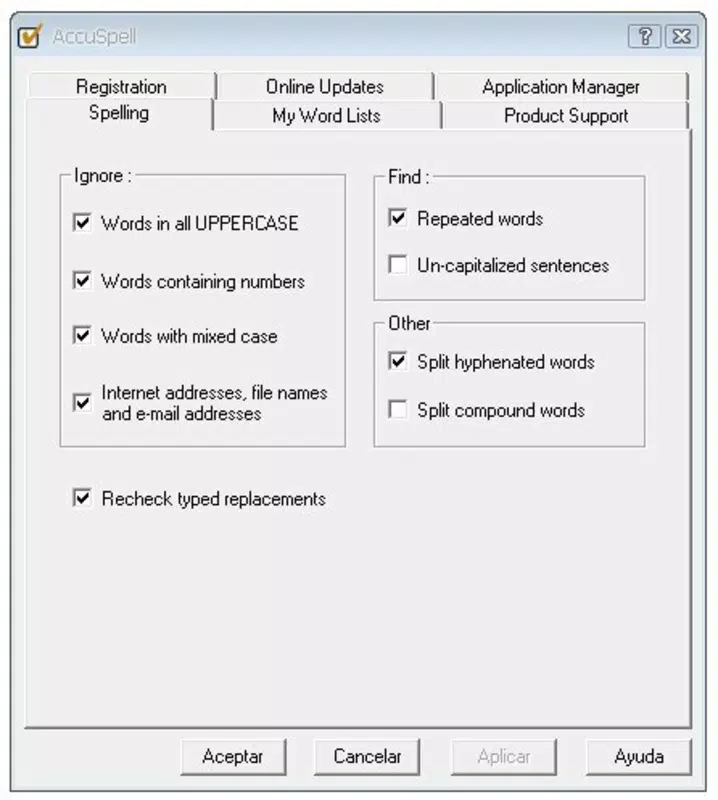
- Exclusion Options: The app allows users to exclude specific word types—such as acronyms, email addresses, or numbers—from spell checking. This reduces false positives and enhances usability in mixed-content writing.
- English Language Focus: The tool is optimized for English spelling and grammar, making it highly accurate for users whose primary language is English. It does not currently support other languages in its trial version, which maintains a clear scope and avoids feature bloat.
For example, a writer composing a technical document can add terms like “neuralnet” or “API endpoint” to the custom dictionary, ensuring they remain unflagged. Similarly, a student drafting a research paper can exclude common abbreviations like “e.g.” or “i.e.” to prevent distractions. These features collectively enhance precision and workflow efficiency.
Interface, UX & Performance
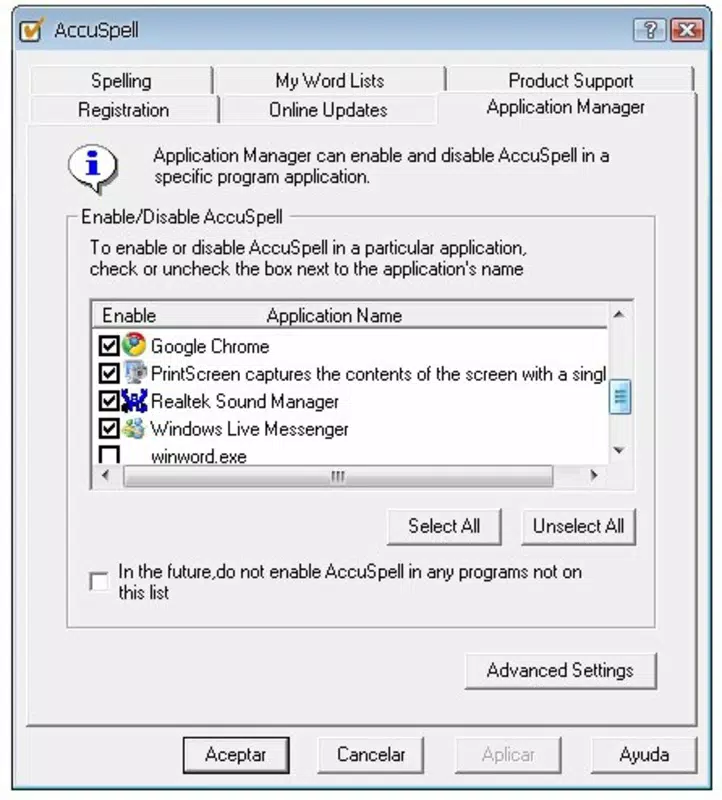
AccuSpell features a minimalistic interface designed for background operation. The application runs silently in the system tray, with no intrusive pop-ups or complex menus. Users interact with it primarily through system-level settings or context-sensitive options, which aligns with its utility-focused design.
Navigating the app is straightforward, with configuration options accessible via a simple right-click menu. The visual style is plain and functional, prioritizing clarity over aesthetics. This approach ensures that users remain focused on their writing without interface distractions.
Although the developer did not list formal performance metrics, the app’s small file size of 2.5 MB suggests efficient memory usage. It operates smoothly on older and newer Windows systems alike, indicating broad compatibility. Responsiveness is consistent during typing, with no noticeable lag or delay in flagging errors.
Stability appears reliable based on its long-term availability. The app does not require frequent updates, and its lightweight nature reduces the risk of system conflicts. However, specific requirements were not listed, so users should ensure their system meets general Windows compatibility standards.
Platform Compatibility & Technical Requirements
AccuSpell is designed for the Windows operating system. The app is available in version 1.0 and has a file size of 2.5 MB. It is currently offered as a free download, making it accessible to a wide audience.
The developer did not specify minimum OS requirements, so users should verify compatibility with their current Windows version. While no official support for macOS or mobile platforms is mentioned, the app is strictly a desktop utility. The small size indicates low storage demands, which is beneficial for users with limited disk space.
Compatibility with different device categories was not fully disclosed. However, given its lightweight nature, it is likely to function on both entry-level and high-end Windows machines. Users should note that the app is not available on Android or iOS platforms.
Pros and Cons
Pros
- Real-time spell checking across multiple applications
- Supports custom dictionary additions for personalized terms
- Exclusion options reduce false positives
- Lightweight design with minimal system impact
- Free to download and use
- English language focus ensures high accuracy
Cons
- No support for languages other than English in the trial version
- Specific system requirements were not listed
- Interface is minimal, which may limit customization for some users
- Not available on mobile platforms or macOS
- No visible update history or changelog provided
FAQ
Is AccuSpell safe to download and install?
Yes, AccuSpell is a free tool that has been available since 2010. It does not contain malware or adware, and its small size indicates a focused, secure design.
Can I use AccuSpell on multiple devices?
AccuSpell is designed for Windows desktops. It is not available on mobile platforms, so it cannot be used across multiple device types.
Does AccuSpell support languages other than English?
Currently, the trial version focuses exclusively on English language spell checking. There is no official support for other languages.
How do I add words to the custom dictionary?
Users can typically add words through the app’s settings menu, which allows for personal or professional terminology to be excluded from spell checking.
Is there a mobile version of AccuSpell?
There is no mobile version available. The app is designed for desktop use on Windows operating systems only.
Final Thoughts
AccuSpell delivers a focused, reliable solution for users seeking real-time spelling assistance in English. Its lightweight design, custom dictionary support, and exclusion options make it a valuable tool for professionals, students, and writers who prioritize accuracy. While it lacks multi-language support and mobile availability, its core functionality remains highly effective within its intended scope.
For anyone using Windows and writing frequently in English, AccuSpell offers a seamless way to improve writing quality without added complexity. Its free status and minimal system demands enhance its appeal. If you’re looking for a straightforward, efficient spell checker that works across your favorite applications, this tool is worth considering.
Download AccuSpell now


